5. Gardener
Module in charge of managing configurations, credentials, user-data for forj forges, as well as creating and destroying the static nodes of the forge.
5.1. Install Gardener
The installation of gardener.
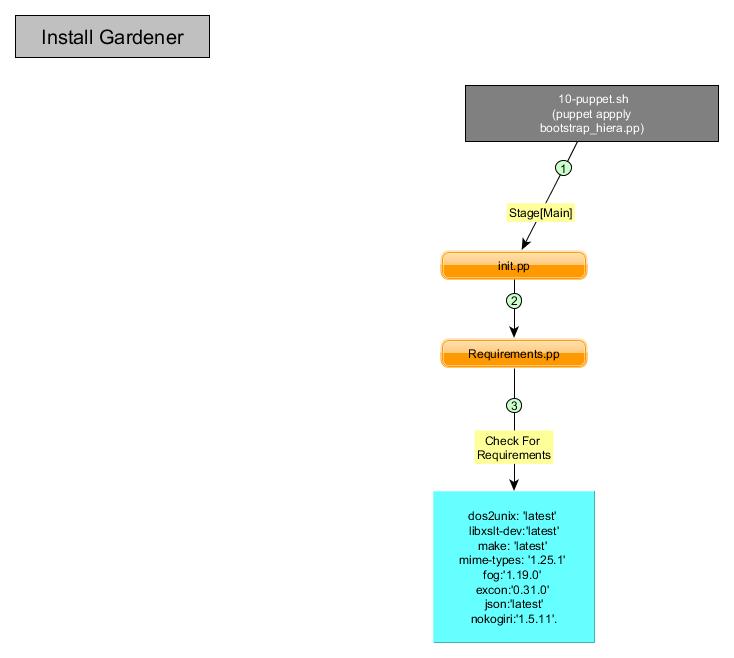
- During the creation of master, in the file 10-puppet.pp the instruction puppet apply $PUPPET_FLAGS –modulepath=$PUPPET_MODULES /opt/config/production/puppet/manifests/bootstrap_hiera.p in the Stage [Main] the file init.pp from gardener is loaded.
- The file init.pp include the class requirements, this loads the file requirements.pp.
- The file requirements.pp, look for the requirements and their versions.
Figure below shows the flow of control.
5.2. Verifying Installation and Loading Plug-ins
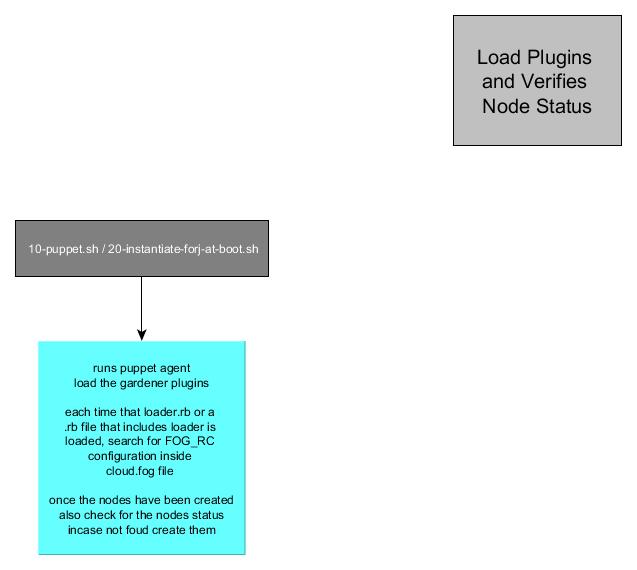
At the end of 10-puppet.pp, one execute the command puppet agent $PUPPET_FLAGS –waitforcert which verifies the install and loads the puppet plug-ins (the gardener’s plug-ins are also loaded).
At the end of the file 20-instantiate-forj-at-boot.sh, one execute the command puppet agent –debug –verbose $PUPPET_FLAGS –waitforcert, which verifies the install and checks the status of the nodes, if any node is listed as not found or not created, it is created.
5.3. Loading Provider and Credentials
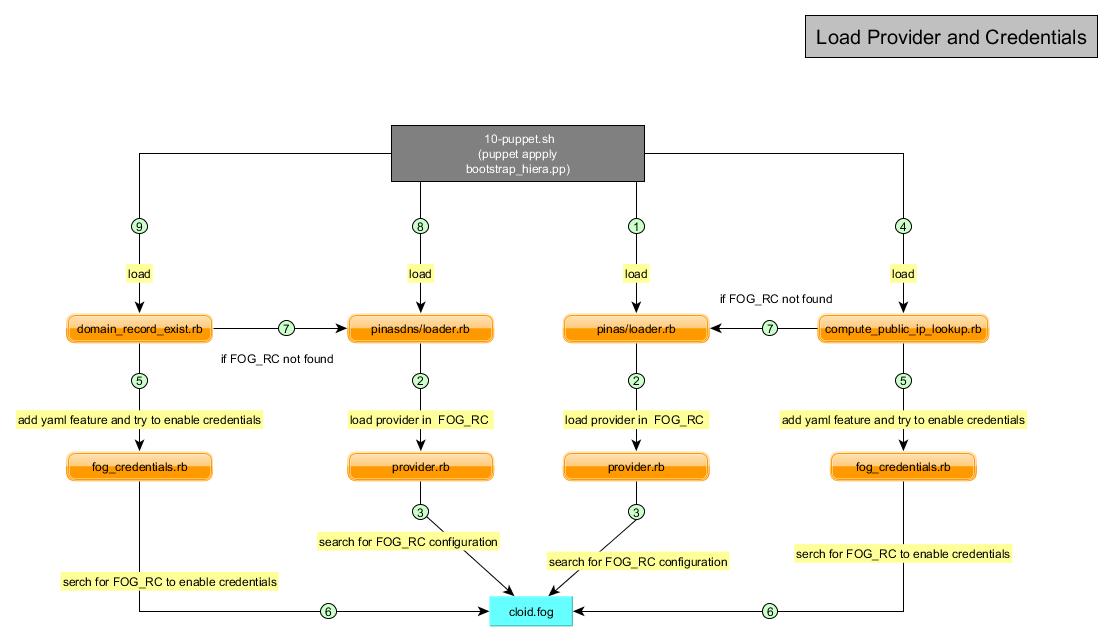
When the plug-ins are loaded, will load the provider and credentials configuration
- Load pinas/loader.rb.
- Loader will try to get the provider using provider.rb.
- provider.rb will search for the configuration section clled FOG_RC inside the configuration file cloud.fog.
- Next compute_pulblic_ip_lookup.rb will be loaded.
- This one will check for if the fog_credentials exist if no will create whit fog_credentials.rb.
- fog_credentials will add the feature credentials to yaml and try to load it from the file cloud.fog.
- In case that not found the compute_pulblic_ip_lookup.rb will try to load FOG_RC using pinas/loader.rb.
- Load pinasdns/loader.rb and will do 2 and 3..
- load domain_record_exists.rb and will try to do 5 and 6 if necessary 7.
5.4. Creating User Data
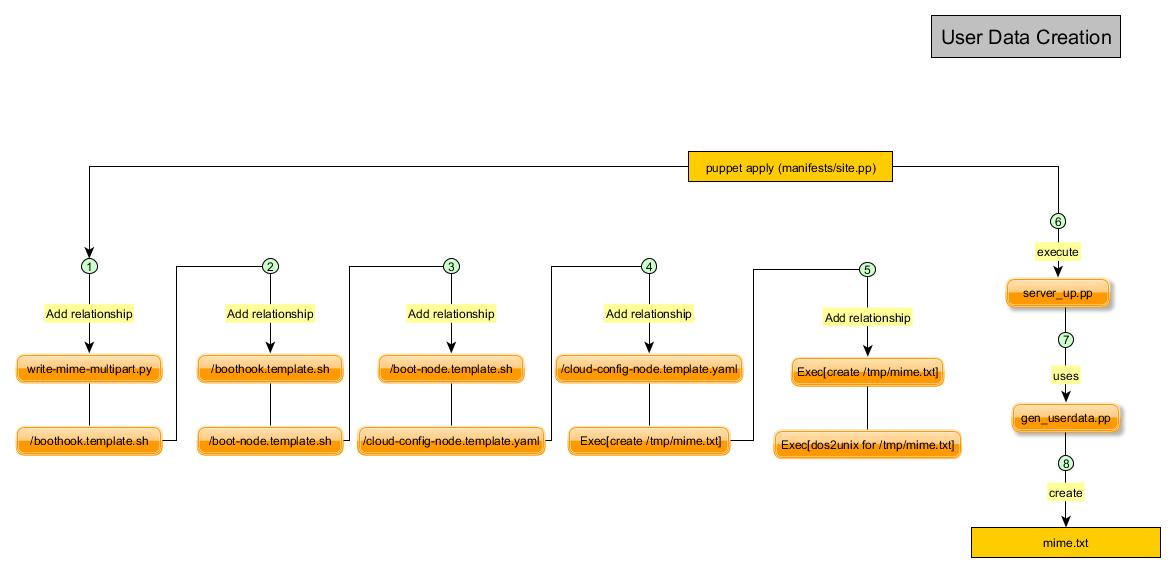
20-instantiate-forj-at-boot.sh creates the nodes of the blueprint with user-data.
- Is set a relationship write-mime-multipart.template.py before boothook.template.sh.
- Is set a relationship boothook.template.sh before boot-node.template.sh.
- Is set a relationship boot-node.template.sh before cloud-config-node.template.yaml.
- Is set a relationship cloud-config-node.template.yaml before Exec[create /tmp/mime.txt].
- Is set a relationship Exec[create /tmp/mime.txt] before Exec[dos2unix for /tmp/mime.txt].
- Then the gardener::srever_up.pp::gen_userdata will be executed.
- This will use gardener::gen_userdata.pp execute the files necessary for the generation.
- gardener::gen_userdata will create the file mime.txt according to the relationships created before.
5.5. Creating Nodes
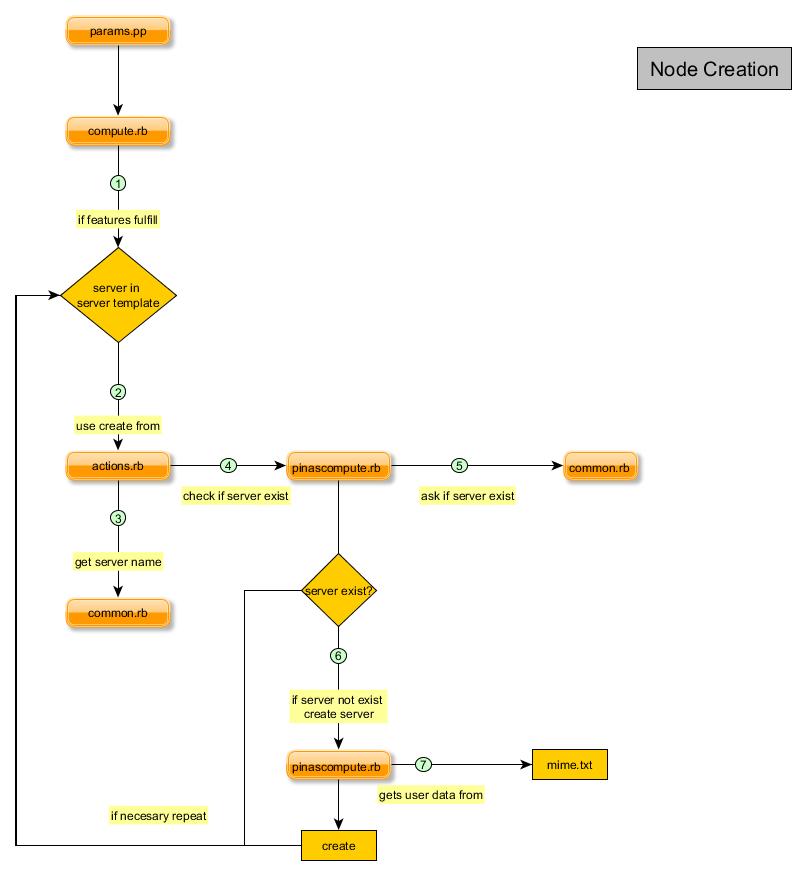
This is one of the main functionalities of gardener.
- gardener::params.pp has as one of its attributes compute, which call to compute.rb.
- compute.rb will call actions.rb method create, while have servers in the template this will be executed.
- actions.rb get the server name using common.rb get server_name function.
- Next, actions.rb will check if the server already exists, using pinnascompute.rb server_exist? function.
- This function uses common.rb find_match function to check if exists.
- If not exist pinascompute.rb sill use the method create_server.
- This method gets parameters from mime.txt and try to create new server.
5.6. Destroying Nodes
this functionality will destroy the nodes created.
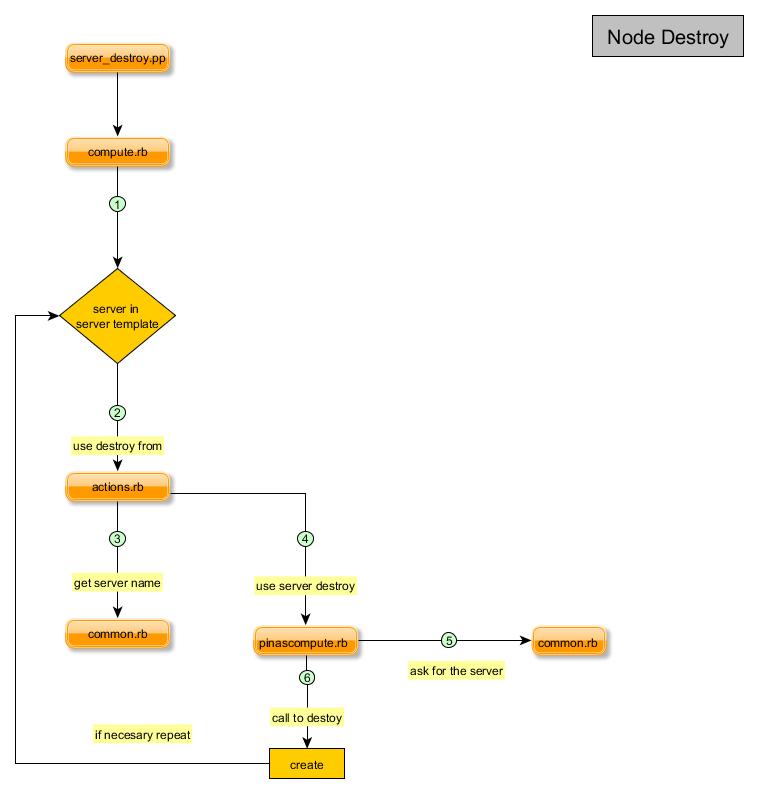
maestro::orchestrator::unwindallservers will use gardener::server_destroy.
- This one will use compute.rb to destroy the servers using actions.rb.
- To destroy the server will do it one by one according to the server template.
- To do it first will get the server name using common.rb get_servername.
- Now that it has the server name will use pinascompute.rb server destroy method.
- To destroy it first it recover the server using common.rb find_match.
- And then it just destroy the server.